Bridge CMS

An AI CMS built for everyday website content management.

Bridge CMS is a content management system for website content, language versions and day-to-day publishing. Its AI assistant helps with copy and SEO, automatic translation completes additional languages, and the website chatbot answers visitors from published content.

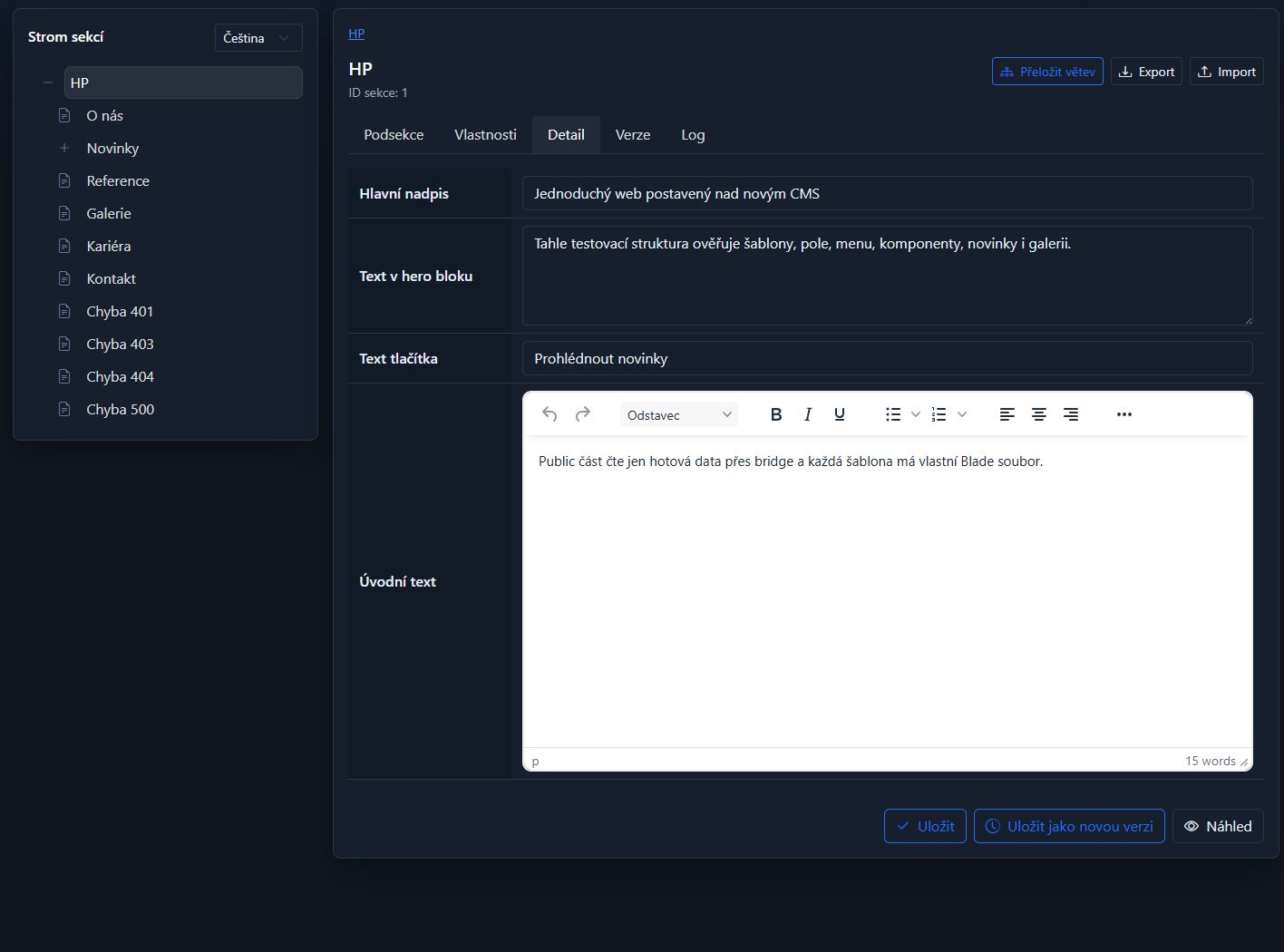
Content editor and page tree in Bridge CMS AI inside website management
01Content under control
02AI assistant
03Automatic translations
04Visitor chatbot

One place for the whole website

Less routine. More time for content worth publishing.

A CMS should not become another system your team has to work around. We shape Bridge CMS around the real structure of your website and the people who look after it. AI sits inside as a practical colleague: it drafts, finds context, translates and speeds up repetitive work. The final decision stays with a person.

What your team gets

From the first idea to a useful answer for a visitor.

01

An AI assistant that knows the website

Describe the task in a normal sentence. The assistant works with the relevant content and returns something concrete instead of generic advice.

  • Drafts news, pages and first versions of copy
  • Improves SEO titles, descriptions and language versions
  • Works with documents, tables, screenshots and images
  • Every proposed change remains under human control
02

Content that stays easy to navigate

Pages, news, galleries and project-specific content types each have a clear place, the right fields and a straightforward editing flow.

  • Website tree and quick collections for frequent content
  • Preview before publishing and version history
  • Images, files and media kept with the content
  • Access that reflects how the team really works
03

Another language is no longer another project

AI fills missing language versions without touching text that is already there. Translate one page or a much larger part of the website.

  • Pages, whole branches and content collections
  • Shared dictionary entries and public lists
  • Large translation jobs can run in the background
  • The result stays fully editable and ready for review
04

A chatbot grounded in your website

Visitors ask in their own words. The chatbot searches published content, answers in the current language and links to the pages behind the answer.

  • Answers based only on public website content
  • Custom name, greeting, colour and tone
  • Language follows the active website version
  • A natural route to contact when the answer is not online

Bridge CMS in practice

See the website, content management, AI and chatbot working as one system.

This short walkthrough uses a town website, but the same foundation works for companies, schools, cultural organisations, associations and larger portals.

Video walkthrough ยท 1 min 40 sec

Real product screens

Tools people can understand without weeks of training.

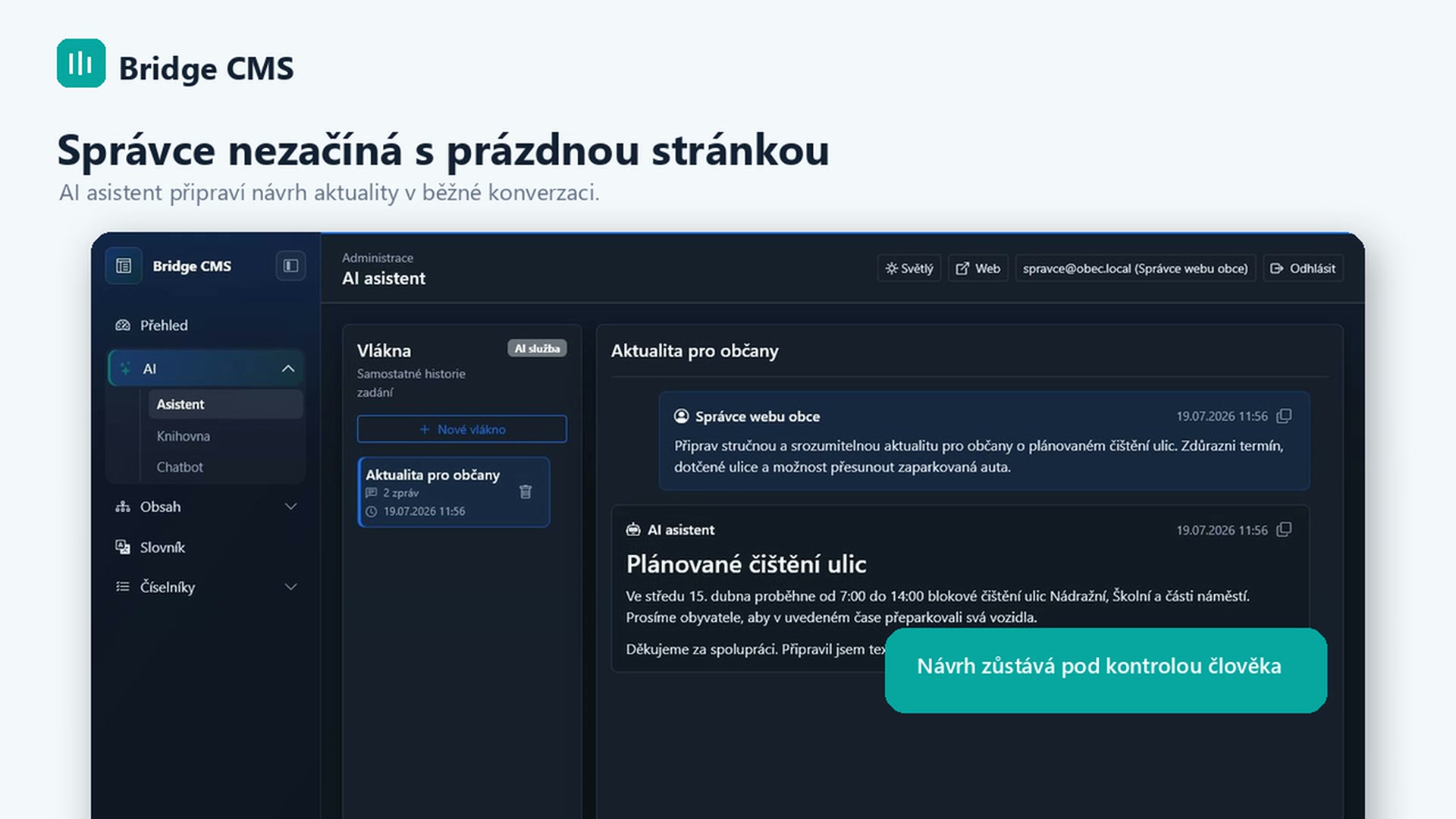
The Bridge CMS AI assistant drafting a public update
AI assistant

Write the request as if you were asking a colleague.

The assistant prepares copy, changes and a sensible next step inside the CMS.

Content editor and page tree in Bridge CMS
Content management

The website structure is clear at a glance.

Content, preview and versions live together without needless detours.

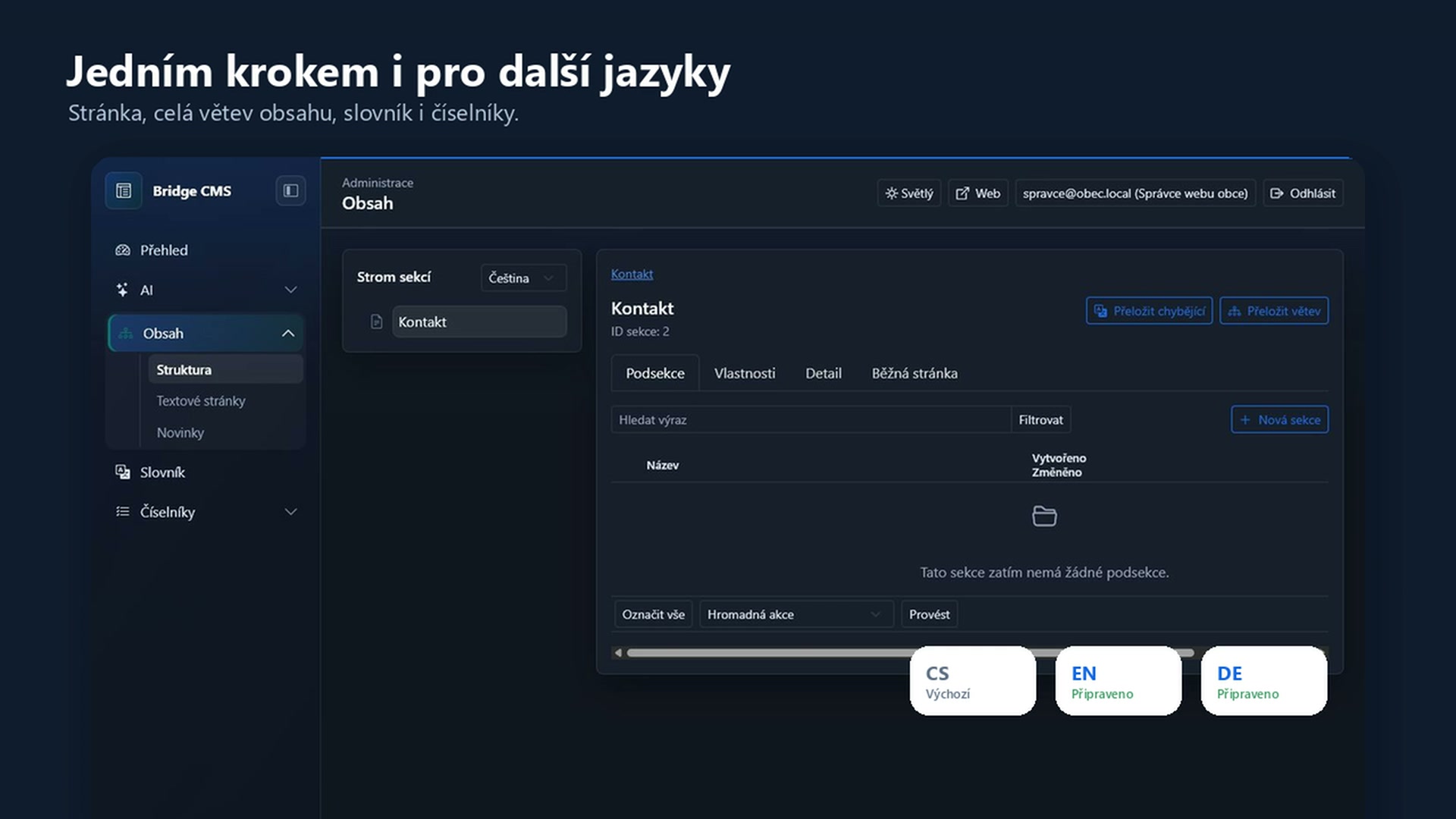
Automatic website translation into additional languages
Translations

Language versions without copying field by field.

A page, a branch, shared text and public lists can all be completed in a few clicks.

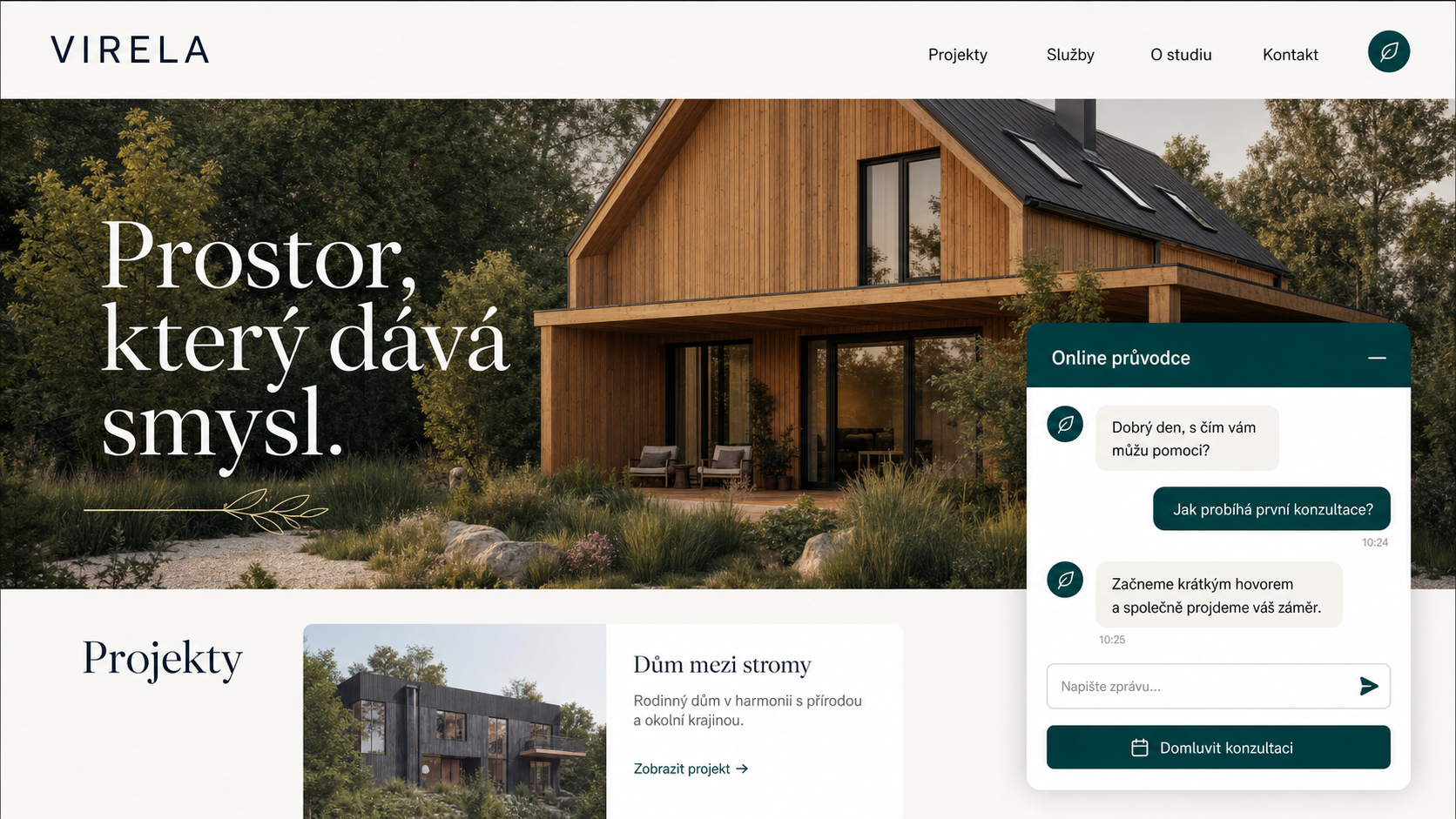
Public chatbot open on a website
Chatbot

An answer where the visitor is already looking.

The chatbot uses published content and points people to the relevant pages.

Who it is for

One reliable core. A different website every time.

Bridge CMS is not a box built for a single industry. It adapts to the information you manage, the people who manage it and what visitors need from the website.

01

Towns and municipalities

News, resident services, official information, events and a chatbot that quickly guides people to the right page.

02

Companies and service providers

A clear offer, references, news and contact information, including language versions for international clients.

03

Schools and cultural organisations

Events, programmes, notices and practical information that several people can keep up to date.

04

Associations and non-profits

Projects, documents, articles and calls to action without depending on the one person who understands the admin area.

05

Product and content websites

Structured catalogues, media, SEO and larger volumes of records that can also be handled in batches.

06

Portals and tailored solutions

When a standard theme falls short, the CMS provides a stable content foundation for a public experience designed around the project.

How the solution takes shape

The CMS adapts to the website, not the other way round.

  1. 01

    We shape the content and structure

    We clarify what visitors look for and what your team needs to maintain.

  2. 02

    We connect languages, roles and AI

    Each person gets the tools that belong in their everyday work.

  3. 03

    The website stays ready to grow

    New content types and features can be added without rebuilding what already works.

Frequently asked questions

What to know before choosing an AI CMS.

Straight answers for teams considering a new content management system or a website rebuild.

01

What is Bridge CMS and what is it used for?

Bridge CMS is a content management system for websites and structured content. It brings pages, news, media, language versions, roles, version history and publishing into one workspace.
02

What can the AI assistant do in the CMS?

The AI assistant can draft pages and news, improve copy and SEO metadata, help with translation and work with documents, spreadsheets, screenshots and images. A person reviews the result before it is published.
03

Can Bridge CMS manage a multilingual website and translate content automatically?

Yes. Teams can translate one page, a whole branch or a content collection. AI fills missing language versions while completed copy remains intact, editable and ready for review.
04

What information does the website chatbot use?

The chatbot searches only published public content from the website. It answers in the active language and links visitors to the pages behind the answer.
05

What types of website is Bridge CMS suitable for?

It works for business websites, towns, schools, cultural organisations, associations, non-profits, product websites and larger portals. The content structure is shaped around each project.

Let us look at your website

Your next update does not have to begin with an empty page.

We will demonstrate Bridge CMS with a concrete scenario and explain honestly how it could fit your website and day-to-day operation.